Difference between revisions of "CVV2 Mismatch"
From KB
(Created page with "CVV2 Mismatch is an error message you may receive when processing a transaction. You will typically get this message if the security code you enter from the back of the card does...") |
|||
| (One intermediate revision by the same user not shown) | |||
| Line 3: | Line 3: | ||
| − | + | <gallery widths=150px heights=200px perrow=5> | |
| + | File:CVV Step 1.png| '''1.''' In the application choose Config | ||
| + | File:CVV Step 2.png| '''2.''' Choose Security | ||
| + | File:CVV Step 3.png| '''3.''' Choose Fraud Control | ||
| + | File:CVV Step 5.png| '''4.''' Find the CVV option and change it to Ask if Manual''' | ||
| + | File:CVV Sale.png| '''5.''' On the Sale screen you will now see the CVV prompt when you are keying in a transaction | ||
| + | </gallery> | ||
Latest revision as of 10:35, 31 March 2017
CVV2 Mismatch is an error message you may receive when processing a transaction. You will typically get this message if the security code you enter from the back of the card does not match the banks records. If you did not enter a CVV code and receive this message it means the processor is requiring a CVV code to be entered. You can turn on the option to enter the code with the following steps.
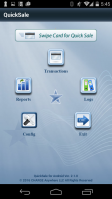
1. In the application choose Config
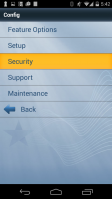
2. Choose Security
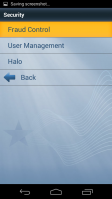
3. Choose Fraud Control
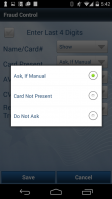
4. Find the CVV option and change it to Ask if Manual
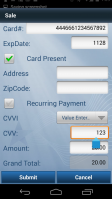
5. On the Sale screen you will now see the CVV prompt when you are keying in a transaction


