Difference between revisions of "Locating Bluetooth Pin"
From KB
| (3 intermediate revisions by the same user not shown) | |||
| Line 1: | Line 1: | ||
| − | Bluetooth printers, swipers, and EMV readers require a pin code to be able to connect to your | + | Bluetooth printers, swipers, and EMV readers require a pin code to be able to connect to your mobile device. Here is a listing of how to obtain the pin code for devices supported by the Quicksale mobile application |
| − | <gallery widths= | + | <gallery widths=270px heights=270px perrow=3> |
| − | File:Miura Pin.jpg| '''1.''' The Miura M006 and M010 will display a pincode on the device. Confirm that the pin matches on your | + | File:Miura Pin.jpg| '''1.''' The Miura M006 and M010 will display a pincode on the device. Confirm that the pin matches on your mobile device and press the check to pair |
File:Woosim.jpg| '''2.''' The Woosim R240 and R241 printers use a pin 1234 | File:Woosim.jpg| '''2.''' The Woosim R240 and R241 printers use a pin 1234 | ||
File:P25 Pin.jpg| '''3.''' The P25 uses and 8 digit pin code that is printed in the paper well. Open the receipt cover and remove the paper roll | File:P25 Pin.jpg| '''3.''' The P25 uses and 8 digit pin code that is printed in the paper well. Open the receipt cover and remove the paper roll | ||
</gallery> | </gallery> | ||
Latest revision as of 08:47, 28 March 2017
Bluetooth printers, swipers, and EMV readers require a pin code to be able to connect to your mobile device. Here is a listing of how to obtain the pin code for devices supported by the Quicksale mobile application

1. The Miura M006 and M010 will display a pincode on the device. Confirm that the pin matches on your mobile device and press the check to pair
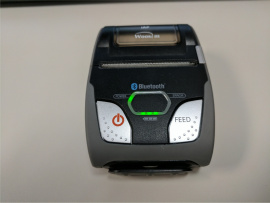
2. The Woosim R240 and R241 printers use a pin 1234
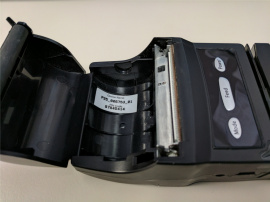
3. The P25 uses and 8 digit pin code that is printed in the paper well. Open the receipt cover and remove the paper roll


