Internal Error

An Internal Error occurs when the Charge Anywhere application either stops responding or loses it's connection to your QuickBooks Company file. The easiest way to restore the application is to fully close QuickBooks and Charge Anywhere through the Windows Task Manager and restart Quickbooks.
1. In order to make sure the Quickbooks application has completely stopped press Ctrl + Alt + Delete on your keyboard.
When presented with a list of options choose "Start Task Manager"
- For Windows 7: click on the Processes tab and look for the Quickbooks process QBW32.exe click on this process and select End Process
- For Windows 8 and Windows 10: look for the Quickbooks process Quickbooks(32bit) click on this process and select End Process
2. With the Quickbooks application closed look for the application in your Task Manager Charge Anywhere Wrapper. Click on this process and select End Process.
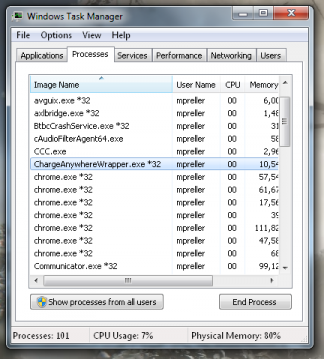
1. Ending the Charge Anywhere Process in Windows 7
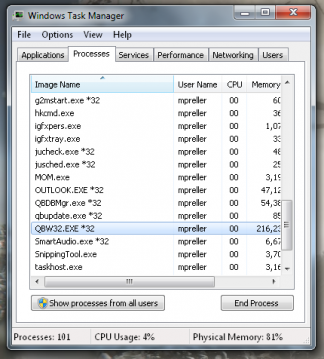
2. Ending the QuickBooks Process in Windows 7


3. Open up QuickBooks again and the application should start up properly
If you have any questions or if the above steps did not work, please contact us at 800-211-1256 option 1 for Tech Support
